OpenAI “Atlas” AI Browser: The Next Evolution of Web Browsing (and Why It Matters)
In the last decade, web browsers have mostly competed on familiar ground: speed, battery life, extensions, privacy settings, and how well they sync across devices. But AI has changed the game. Instead of treating the browser as a “viewer” for the web, the next generation treats it as a workspace—a place where you can ask questions, summarize what you’re reading, extract data, and even delegate actions (like filling forms or completing multi-step tasks).
That’s the idea behind ChatGPT Atlas, OpenAI’s AI-first browser built with ChatGPT at its core. It’s not “a browser with an AI extension.” It’s a browser designed from the start to make AI a first-class part of how you navigate the internet.
So what exactly is Atlas, what can it do, and why are AI browsers suddenly a battleground for the future of the internet?
What is OpenAI Atlas?
ChatGPT Atlas is a proprietary web browser from OpenAI, currently available on macOS (with broader platform support discussed publicly as “coming later”). It’s built on Chromium, which means it inherits compatibility with modern web standards and many familiar browser behaviors.
But Atlas’s core differentiator is that it puts ChatGPT directly inside the browsing experience—not as a separate site you switch to, and not as a pop-up extension that only works sometimes, but as a persistent assistant that can understand what you’re viewing and help you act on it.
OpenAI positions Atlas as part of a bigger shift: moving from “searching and clicking” to “asking and doing.” In other words, the browser becomes a doorway to an AI assistant that can interpret your context and help you complete goals.

Why build an AI browser now?
OpenAI’s argument is simple: the browser is where your work and context live. You might search inside ChatGPT, but your tabs include your docs, emails, dashboards, research sources, shopping carts, product comparisons, and tools. A browser that can see (with your permission) what you’re doing can become a more effective assistant than a standalone chatbot.
There’s also a competitive reason. Browsers are strategic platforms:
-
they control the default search and discovery experience,
-
they influence user data flows and privacy choices,
-
and they’re the “surface area” where assistants can integrate deeply.
That’s why multiple players (including OpenAI and others) have been reported as pushing AI browser efforts at the same time.
Key features of ChatGPT Atlas
Atlas markets itself around three big ideas: AI assistance on every page, task automation, and user-controlled privacy.
1) ChatGPT Sidebar: AI help on any webpage
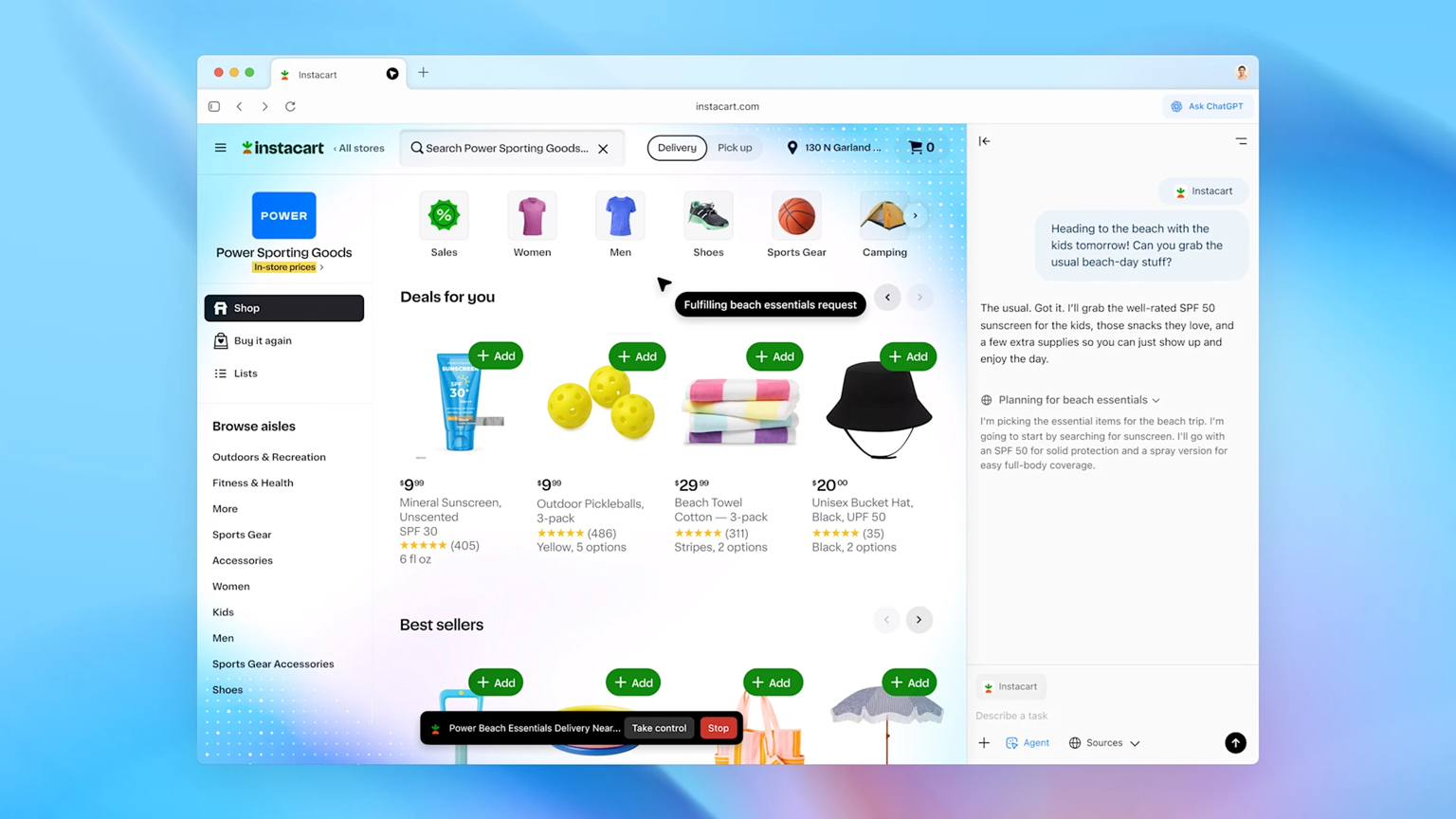
One of Atlas’s most visible features is the ChatGPT sidebar, which you can open alongside whatever page you’re viewing. From there you can:
-
summarize an article you’re reading,
-
compare items across tabs,
-
extract key points,
-
ask questions about what’s on the page,
-
and get help rewriting text (like an email draft) without copying everything into another app.
This matters because it reduces friction. Instead of “copy → paste → ask → copy back,” your assistant lives next to the content.
2) Agent Mode: the browser that can do things
Atlas also introduces Agent Mode (often described as a preview feature for certain subscription tiers). The idea is that the assistant can perform multi-step tasks on the web—like navigating sites, filling forms, or completing workflows that usually require repetitive clicking.
In plain English: Atlas doesn’t only help you understand the web; it can help you operate the web.
This has obvious benefits for:
-
travel planning (searching, comparing, assembling an itinerary),
-
online shopping (finding items, comparing options),
-
admin work (forms, portals, repetitive workflows),
-
research (collecting sources, summarizing, organizing notes).
It also raises obvious questions about safety and control—which we’ll cover shortly.
3) Familiar browser fundamentals (because people won’t switch otherwise)
A browser can’t be “AI magic” and forget the basics. OpenAI’s own setup docs emphasize standard browser expectations such as importing bookmarks and settings, managing passwords/passkeys, and using Chromium-like menus.
This is a subtle but important strategy: Atlas is trying to make the leap to an AI browser feel like an upgrade, not a migration to a totally unfamiliar tool.
Under the hood: Chromium + OWL (OpenAI’s Web Layer)
OpenAI has published technical detail about building Atlas, including a key architecture layer called OWL (OpenAI’s Web Layer)—their integration approach for Chromium inside the Atlas app.
Why does this matter? Because embedding a full browser engine inside an AI-centric product brings real engineering challenges:
-
process isolation,
-
performance,
-
stability,
-
security boundaries,
-
and how the assistant “observes” the page without becoming a privacy/security nightmare.
OpenAI’s OWL write-up frames this as a structural foundation: Atlas isn’t just a UI wrapper around Chromium; it’s an integrated system designed to support AI features while keeping the browser reliable.
Privacy in Atlas: what OpenAI says you control
Whenever a browser adds AI, people immediately ask: “Does it read everything I do?”
OpenAI has publicly emphasized privacy controls and user choice, with discussion around what data is used, what is stored, and what settings can be enabled or disabled. Reporting on Atlas has highlighted options around controlling data sharing and “memories” features (where enabled).
A practical way to think about Atlas privacy is in layers:
-
On-page assistance: the model needs some level of context to summarize and answer questions about what you’re viewing.
-
Agent actions: automation requires the agent to interpret page content and interact with it.
-
Memory features (optional): if enabled, Atlas may retain helpful context (the trade-off is convenience vs. sensitivity).
If you’re writing about Atlas for a tech audience, the most honest framing is: AI browsers create new privacy trade-offs, and the “right” setup depends on the user’s comfort level and threat model.
The security problem no AI browser can ignore: prompt injection
If an AI agent can read webpages and take actions, then malicious webpages can try to manipulate the agent.
This class of attacks is widely discussed as prompt injection—where untrusted content (like hidden text on a webpage) tries to override instructions and push the model toward actions the user didn’t intend.
OpenAI has published about hardening Atlas against prompt injection, including shipping security updates and describing ongoing defenses and red-teaming.
The big takeaway: agentic browsing expands the attack surface. Traditional browsers already deal with phishing, malicious scripts, and exploit kits—but AI agents add a new layer: the risk of instruction manipulation.
That doesn’t mean AI browsers are doomed. It means:
-
agent mode needs strong guardrails,
-
permissions should be explicit,
-
sensitive actions should require user confirmation,
-
and users should treat autonomous browsing like giving a tool partial control of their keyboard and mouse—because functionally, that’s close to what it is.
Atlas vs Chrome vs Edge vs “the AI browser wave”
The browser market is massive and sticky. People rarely switch unless they get a clear advantage or a forced default change. That’s why Atlas isn’t just a product—it’s also a signal that the browser is becoming the primary battleground for AI assistants.
Industry coverage has described a broader push where AI-native browsers and AI integrations are challenging the old “tab-and-search” model.
Atlas’s biggest competitive bet is this:
-
Chrome is the web’s default, but it’s still largely “manual browsing.”
-
Atlas wants to be “interactive browsing,” where the assistant helps you understand and execute, not just load pages.
Whether that becomes mainstream depends on three things:
-
Trust (privacy + security),
-
Reliability (agent mode must be predictable),
-
Real daily usefulness (it needs to save time, not create new friction).
Who should try Atlas?
Atlas makes the most sense for people who spend a lot of time doing knowledge work inside a browser:
-
Researchers and students: summarize sources, extract points, compare tabs, build notes faster.
-
Founders and marketers: competitive research, landing page analysis, copy rewrites in context.
-
Shoppers and analysts: comparisons across multiple sites, pros/cons, spec breakdowns.
-
Operators and admins: repetitive web workflows where agent mode could reduce time.
If your day involves “open 15 tabs, copy stuff around, assemble a decision,” Atlas is targeting you.
Practical tips for using Atlas safely (especially with Agent Mode)
If you’re experimenting with Atlas (or any AI browser), these habits are smart:
-
Treat agent mode like a junior assistant
-
Great at repetitive steps.
-
Needs supervision on anything costly, sensitive, or irreversible.
-
-
Confirm before purchases, bookings, and form submissions
-
Even small errors can be expensive.
-
-
Be cautious on unknown sites
-
Untrusted content is where manipulation attempts can hide.
-
-
Keep “memories” intentional
-
Convenience is real, but don’t store sensitive details unless you’re sure you want them retained.
-
-
Use separate profiles
-
Consider one profile for casual browsing and another for work/agent workflows.
-

What Atlas means for the future of the web
Atlas is part of a larger shift: the web is moving from being a set of pages you navigate to being a set of environments you operate with an assistant.
That has second-order effects:
-
Search changes: if users ask the assistant instead of clicking results, publishers and SEO strategies evolve.
-
UI changes: websites may need to be more machine-interpretable for agents.
-
Security changes: the web becomes a place where attackers target not only humans, but also their assistants.
OpenAI’s launch (and the broader AI browser momentum) suggests we’re entering a phase where the browser becomes less like a “window” and more like a copilot cockpit.
FAQs
Is OpenAI Atlas available on Windows?
At launch, Atlas has been positioned as a macOS-first browser, with public discussion that other platforms would follow. Availability can change over time, so it’s best to confirm on the official Atlas page and OpenAI help docs.
Is Atlas built on Chromium?
Yes—OpenAI’s help documentation describes Atlas as built on Chromium, and OpenAI has also published engineering details about its Chromium integration (OWL).
What makes Atlas different from using ChatGPT + Chrome?
The difference is integration and context. Atlas keeps ChatGPT inside the browsing workflow (sidebar, page-aware assistance, and agentic actions), rather than making you switch between a browser and a chatbot tab.
Are AI browsers safe?
They can be safe, but the risk profile changes—especially with autonomous features. OpenAI has discussed ongoing work to harden Atlas against prompt injection, but also acknowledges the evolving nature of the threat.
Final thoughts
OpenAI Atlas is a bold attempt to reimagine what a browser is for. If the “web” used to be about finding information, Atlas is betting that the next era is about completing outcomes—faster research, fewer repetitive steps, and a tighter loop between reading, thinking, and doing.
But AI browsers also bring new responsibilities: clearer permissions, stronger safeguards, and user habits that treat autonomous agents with the same caution you’d give any powerful automation.
If OpenAI gets the trust + usefulness equation right, Atlas won’t just be another browser—it could become the default way many people interact with the internet.
For quick updates, follow our whatsapp –https://whatsapp.com/channel/0029VbAabEC11ulGy0ZwRi3j
https://bitsofall.com/ai-interview-series/
https://bitsofall.com/falcon-h1r-7b-reasoning-model/
Implementing Softmax From Scratch: A Complete Guide for Machine Learning Practitioners